Posts

Three Options for an Internet connection at Home

Image
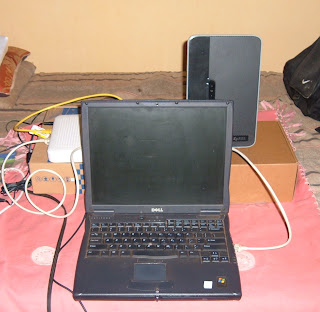
Option Three While this is by far the most costly option, i think it delivers quite a blow. These guys give you 7.2 Mbps of speed to play with on their USB GPRS devices. What i did with this is connect a cable from my laptop to the Wireless Router in order to split up the 10GB that i was offered for that month. Because my primary concern was to get some more devices connected to the Internet, this combinations was great! My only major challenge was to buy the USB GPRS and then pay for the Monthly Costs and then purchase the wireless router to make sure i could split it. In addition, i had some trouble using voice of IP services some of which are not built to communicate using GPRS. With that much power under my hood that problem will soon be resolved. The absence of any particular brands was deliberate. Instead for all three i chose to focus on the technologies.

Three Options for an Internet Connection at Home

Image
Option Two This setting does not differ too much from the first option except instead we make use of the American made wireless router to distribute the signal receive using the Wimax Indoor receiver . The advantage of using this system is that the equipment that is provided by the service provider some ready to use out of the box. If you have your own equipment though, most providers usually have a technical team that can tackle almost any device to acclimate it to their own systems. For the die hard users there is always the standard Internet search! The router in the foreground is available on Kampala Rd. in at a reasonable pocket friendly cost. It also has four ports in the back for additional devices. Most of these routers reserve one port for the Internet connection (to receive the Internet). This particular one is also built with dual sim card capability so that additional services can be included such as use in Home Office Settings. Unless you are ready to handle those larg...

Three Options for an Internet Connection at Home

Image
Option One A few months ago i mentioned that i have a dual boot system that runs Windows XP and Ubuntu 10.04 LTS . It is therefore a pretty big issue in my life if i find a system that can function of both sides and deliver the result that i am looking for. Sometimes you might find that your Internet USB GPRS works well in windows but is unrecognized in Linux. There is software for this but my point is, when i find hardware that works on both sides this is normally a plus point. The first option you see above is offered by one of the recent entries into the Ugandan Market. The monthly fees are quite enticing and the offer comes with the hardware needed to run the system. Judging from some of the inquiries that i made, there is a limit to how far (distance) the system can go. What it basically is a Chinese made Wimax Indoor Router which picks up the signal from one of the their masts and then sends this directly to your PC if you choose or to a another Chinese made Wireless ADSL Ro...

Spicebird

Image
As part of my search for the E-mail Client, i came across this Jewel . If you have worked with E-mail clients before and tried to get your Google Mail accounts, Hotmail Accounts or any others, you probably noticed that there is a lot of information available on how to configure various accounts. Spicebird helps you by finding this information and filling it in for you. Questions about port numbers , incoming addresses and outgoing address are all taken care of by this handy program. Even though there were some problems with the initial install, i would still recommend this software especially the older more stable versions.

Foxit

Image
There are some pretty neat tools for accessing PDF documents. If you have the space go ahead and invest in some of the heavy duty stuff. Foxit works for me because it is very small and enables be to do everything that i need. I admit having had some frustrations with some of the bigger programs but this one saves me some precious space on the HD and also gives me the speed that i need without wearing out the processor. Have used this software now for about three years after a recommendation from Maximum Magazine. Give it a try!

Gimp

Image
There is a list of must have software for the Windows user as well as an equivalent list for the Linux user. The challenge is that for the Linux user, you have to be very specific which vendor your are making reference to. Much of what i present is created for users that are running dual boot systems. Graphics people will appreciate gimp which allows you to create some pretty cool stuff and is designed to run on both platforms. GNU Image Manipulation Program (GIMP) is designed primarily for tasks such as " photo retouching, image composition and image authoring ". Try it out i think you will like it.

Sea Monkey

Image
If you are like me, there are certain things that you expect a good browser to do. If that browser disappoints you the chances are you will head straight for google and find the most recent and reliable link to a new download that fulfills your expectations (even though this download is for a completely different product). Do you want to have a central place where your e-mails can be sent especially if they are part of an e-mail client ? Then SeaMonkey is the tool for you. Do you want to establish a link to your favorite chat platform? You guessed it! SeaMonkey is the tool for you. There are hurdles that are still to be overcome such as the problem that arises out of having all your proverbial eggs in one basket but these can be overcome.